
Security and access
The right person, the right data, the right company.
In Eksenio, access is set by the user's role, the company's enabled modules and the company boundary. Changes are tracked in audit logs.
01Principles
Access is part of the design.
Role-based module access
Every user sees only the modules their role opens. Module licensing and user permission are separate; a role cannot open a module the company has not enabled.
Read-only roles
Define roles that can view records but cannot create, edit or delete them.
Company data separation
Each company's data is separated at database level with row-level security. A user of one company cannot reach another company's records.
Audit log
Record and permission changes are tracked in audit logs with the user and the time; audit records cannot be changed.
02Roles
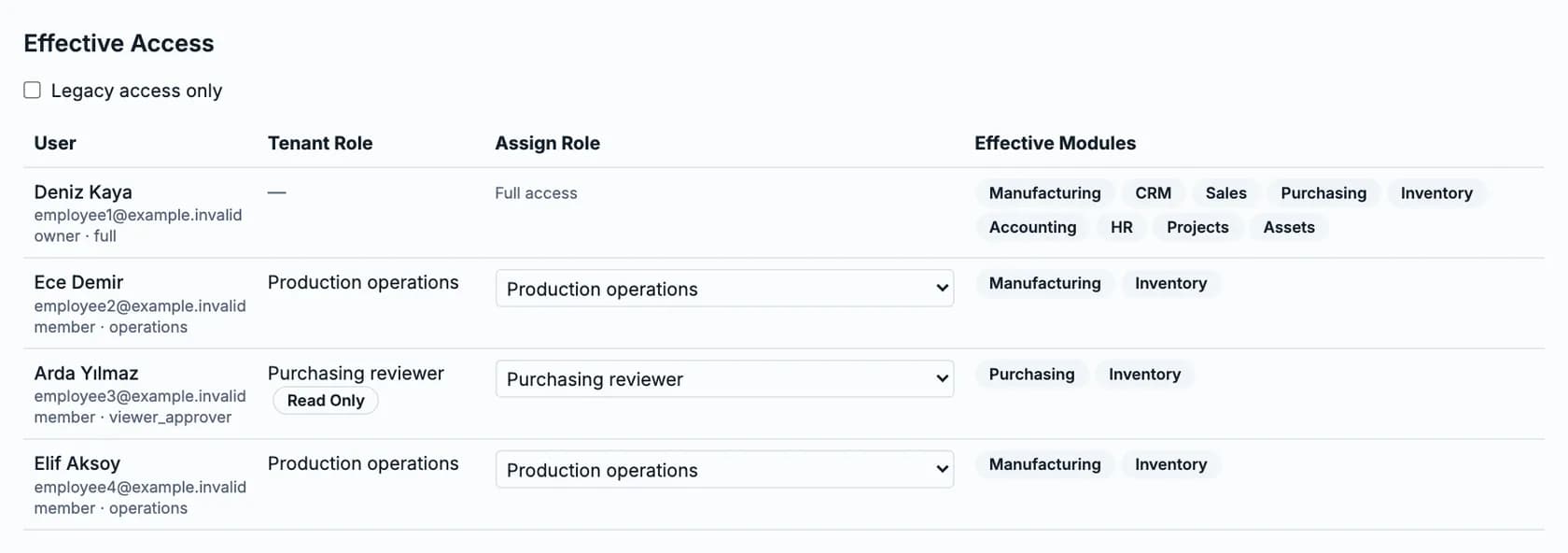
Who can see what? In one table.
The Effective Access screen shows which modules each user can actually open.
- Owner and admin roles add users, assign roles and deactivate users
- Built-in roles for sales, purchasing, inventory, accounting, projects, HR, fixed assets and read-only access
- Custom roles can be defined module by module
- The subscription follows the active user count; deactivated users are not counted
03Eksenio AI
The assistant follows the same boundaries.
- Read-only: it never creates, changes, deletes or approves records
- Reads only data from modules the user's role can open
- Answers only from the user's own company's records
- Offers no direct SQL or database access
To be clear
We make no certification or compliance claim that is not written on this page. We answer your security and data-processing questions in detail during the demo.
Let's talk about your security questions.
We'll review your role structure and access needs together in a demo.